A company AI interface: isolated agents, with MCP connections for actions and data access
ArchitectureDevelopmentFundamentalsAI & LLMs
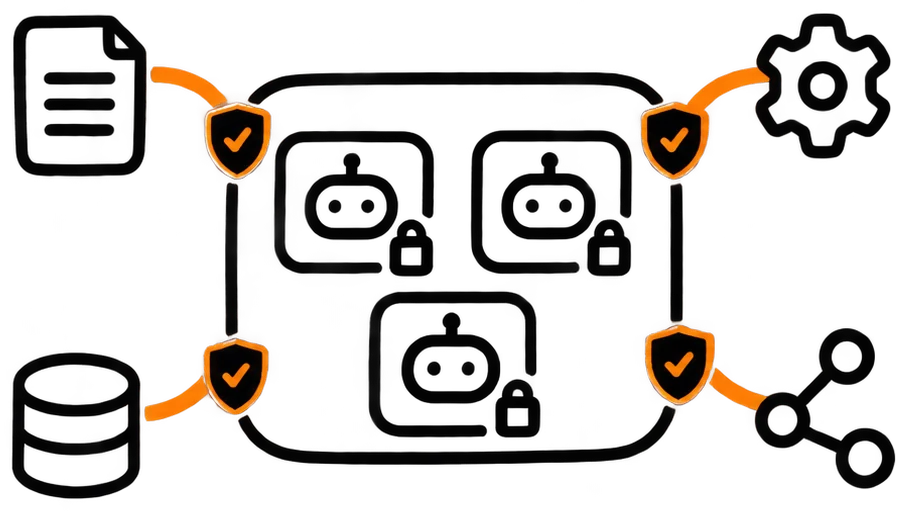
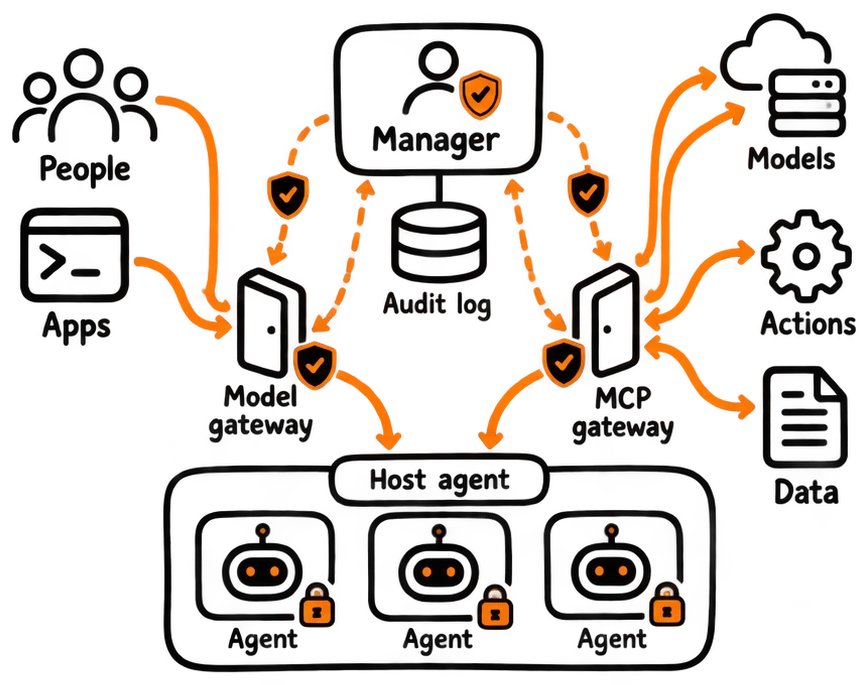
One AI interface for a whole company: people and teams get agents they are allowed to use, each agent runs isolated, and it reaches company data and actions only through MCP connections that are checked on every call. Behind it: a control plane that decides who exists and what they may use, a host agent that turns that decision into isolated containers, drivers that make every model look like the same OpenAI-compatible API, and gateways between untrusted workers and trusted services. Git is the control plane: schema, host configuration and containers are all applied by pushing commits.
Agents are untrusted workers
Each AI runs in its own container, on its own internal network, with no route to the internet except through an allowlisting proxy. It gets an endpoint and a key, never a credential, a Docker socket, host root or an arbitrary mount. Everything trusted lives outside the worker: identity, authorization, credentials, the decision about what runs where.
What people can do with it
One place to work with AI, with only what they're allowed to use.
People sign in with their company account and see the agents their teams were granted. They chat in the web interface, or point any OpenAI-compatible tool or script at the same endpoint with a personal or team token, and the models they may use simply appear as a list.
Team maintainers add people and agents to their team; organization owners connect AI accounts, local model servers or other providers, decide which models are exposed, and grant them to teams. Agents get their tools and data through MCP connections granted the same way, so a team's agent can act on that team's systems and nobody else's.
- Company sign-in, nothing to install
- Chat interface or any OpenAI-compatible client
- Personal, team and organization tokens
- Teams granted agents, models and tools by their owners
What the company gets
Control, visibility and one interface, whichever models are behind it.
Control: who may use which model, agent, tool and data source is decided in one place and enforced on every request, with usage limits and warnings before a limit is reached. Credentials for AI providers and company systems stay on the trusted side and never reach an agent or a user's machine.
Visibility: every action, every grant and every denial is logged centrally, and the logs are indexed and searchable, so questions like who did what, with which agent, on which data, have an answer. The raw event log stays the source of truth; search indexes are built from it.
Independence: every model looks the same to users and agents, so changing provider, adding a local model or mixing several is a setting, not a migration.
- Central control of models, agents, tools and data
- Usage limits with warnings
- Credentials never leave the trusted side
- Everything logged centrally, indexed and searchable
- Provider-independent: one interface for every model
Skills and knowledge that the whole company can reuse
What one team teaches its agents becomes a shared, versioned resource.
Skills, the instructions and procedures that make an agent good at a task, are resources owned by a team, an organization or the company. They can be reused by other agents, updated in one place so every agent using them improves at once, and shared with other teams instead of being copied around.
Documentation works the same way: each document is a resource with an owner, and it can link to other teams' and organizations' documents, so agents and people follow the links across team boundaries instead of finding only what their own team wrote.
- Skills as team, organization or company resources
- Reusable, updatable in one place, shareable
- Documentation cross-linked across teams and organizations
Four things that are not the same thing
agent ≠ container ≠ node ≠ model
An agent is a persistent logical identity. A container is the environment one run executes in. A node is the machine. The model can be local or remote. Keeping these apart is what lets an agent survive a restart, move to another machine, or switch models without changing who it is or what it may do.
The AI-facing interface stays at that level too: start an agent, attach a workspace read-only or read-write, send a message. No Docker, mounts, hosts or providers appear in it.
- Agent, container, node and model as separate concepts
- High-level operations, hidden mechanics
- Workspaces as first-class objects: many readers, exactly one writer, lease-based
The manager decides whether, the host agent decides how
A compromised control plane still can't ask for a privileged container.
A small agent on each Docker host asks the manager every few seconds what should exist, builds or removes containers to match, and reports a phase for each AI: preparing the connection, preparing the engine, waiting for login, ready, or failed with the step and the reason.
The manager sends only an identity and a kind. Images, mounts, networks, capabilities and limits come from templates inside the host agent, so even a compromised manager can't request host mounts, extra privileges or another image. The agent only touches containers it labelled itself and refuses to take over one it didn't create.
manager: desired state→host agent: build / remove→phase report→manager
- Pull-based reconcile loop per host
- Container settings from local templates only
- Phases reported back, with the failing step
Egress through one narrow door
The only container on an AI's network that can reach outside is an egress proxy. It accepts tunnels only to allowlisted hosts and ports, refuses any destination that resolves to a private, loopback or link-local address, so it can't be used to reach the local network, and dials the address it checked rather than looking it up twice. Traffic isn't decrypted; every tunnel and every denial is logged.
A log-only mode lets unlisted hosts through while recording what would have been denied, which is how the allowlist for a new tool is discovered before enforcement is switched on.
- Allowlist for hosts and ports, no internal destinations
- No DNS rebinding: the checked address is the dialed one
- Log-only discovery mode before enforcing
MCP connections for actions and data
Agents reach company tools and data through one checked gateway.
Tools and data are offered to agents over MCP through a single gateway. The reverse proxy in front of it strips any identity headers a client sends, asks the manager who the caller is and whether MCP is allowed, and only then passes the verified user, organization and team along; the gateway sits on its own network and refuses requests that didn't come that way.
Today the gateway carries one tool, a connectivity and identity check. Next, MCP servers become platform resources that are granted to teams like AIs are, so each team's agents see exactly the actions and data sources they were given, with tool discovery for large catalogs.
- Identity checked by the manager on every MCP call
- Client-supplied identity headers dropped
- Planned: MCP servers granted per team, with tool discovery
Every model looks the same
Vendor CLIs and any OpenAI-compatible API, behind one /v1 interface.
Drivers expose each model as an OpenAI-compatible chat API, whether it is a vendor's command-line tool, a local model server or another provider's API. Choosing a model for an agent becomes a setting, and the client runs its own tools: the driver never executes anything.
The hard part is that OpenAI-style requests are stateless, carrying the whole history every time, while command-line sessions are long-lived. The driver maps one onto the other: it tags its replies with an invisible session marker, resumes the right session when exactly one new user message arrives, and starts a new session seeded with the transcript after an edit, retry or branch. A tool call is parked, held open across HTTP requests, until the client's next request brings the result back.
Unknown values stay unknown: a context window the driver can't learn is reported as -1, never a made-up number.
- OpenAI-compatible /v1 over CLIs, local servers and upstream APIs
- Stateless requests mapped onto long-lived sessions
- Parked tool calls across requests
- Context windows learned by probing, never guessed
Git is the control plane
Push a commit, and the hosts apply it.
Host configuration is a list of numbered migrations, applied once each and in order, like database migrations; the host remembers which ones it applied, so out-of-order merges still land. A webhook triggers a run immediately and a timer is the fallback. The webhook listener runs unprivileged and can only touch a trigger file, so it can't run commands as root. A network change carries a boot-time guard that restores the previous configuration if the gateway never answers.
Service stacks deploy the same way, each with optional prepare, post and health-check steps; a failing stack doesn't stop the others. Database schema changes run as a one-shot container before the service starts, forward-only, with checksums on applied migrations and a lock so only one run happens at a time, so schema and code always come from the same commit.
git push→webhook→trigger file→systemd run→migrations / compose up→health checks
- Pull, not push: no central machine needs SSH or root
- Numbered, idempotent host migrations with a rollback guard
- Forward-only schema migrations with checksums and a lock
- Secrets never in git
Tested like it matters
The manager's tests run the real application on Postgres compiled to WebAssembly, with the real migrations and a fake directory server: login, first-login provisioning, outages, concurrent first logins, tokens, organizations. The web UI has an end-to-end test that drives a real browser through sign-in, teams, permissions and a second user's restricted view. Drivers are tested against fake CLIs and fake upstreams, and the Go services reconcile against an in-memory Docker API.
- Stack
- TypeScript (Node.js 24) · Go · PostgreSQL · Docker · Caddy · MCP · Bash